🎯 What We Offer
If you’ve reached this page, the most important thing has already happened: you’ve stopped seeing DePIN as just a fancy word and have started looking at it as a real computational infrastructure.
Now a practical question arises: what to do next, what equipment to choose, where to start, and is it absolutely necessary to buy a new server right away?
This is exactly where DePIN World’s work begins. We don’t try to sell a single "perfect machine for everyone." Such a machine doesn’t exist. One person already has a powerful gaming computer. Another wants to build their first affordable server. A third needs large memory. A fourth is ready to build a serious multi-GPU system. That’s why we’ve built not just one tutorial, but a decision roadmap.
🧭 Map of Possibilities
You can start with a gaming PC, available storage space, an internet channel, or a suitable location. If the assessment makes sense, that direction can be expanded.
A separate production branch is 3D printing and CNC: the digital platform helps you find orders, and your equipment turns the model into a finished part.
The central focus of DePIN World is computational servers. They require a more serious entry, but are compact, easier to combine, and scale faster from one machine to a dedicated server farm.
The first step isn’t about staying at a minimal level forever. It allows you to test the economics and see the next growth stage.
🧮 First — Calculate
Start with our DePIN Server Profit Calculator. You enter equipment specs, number of GPUs, memory, electricity cost, and other parameters, and the calculator helps estimate economics and matches your scenario with server architectures we’ve prepared.
Currently, our database includes five base architectures — from a relatively affordable AM5 server to serious EPYC, Xeon W, and multi-GPU systems. This doesn’t mean there are only five good servers. These are five understandable starting points, for which we’ve considered compatibility, power, cooling, memory, storage, networking, backup power, and further deployment. If your calculation differs slightly, the base architecture can be adapted for your task.
🖥️ Or maybe you don't need to buy anything at all
Before reaching for your credit card, check out the "Use What You Already Have" section.
Don’t buy a new server until you’ve seen what’s already at home or in your office. A powerful gaming computer with a good GPU might be perfectly suitable as a computational node. Available storage, a workstation, or equipment that sits idle most of the day also deserve a calculation first — and only then a decision about a new purchase.
Sometimes the best first DePIN server is the one you never bought.
🛠️ If you decide to build a new server — we won’t leave you with just one diagram
For each build we prepare, the Knowledge Base guides you through the entire journey: from motherboard, CPU, and memory to GPU, power supply, NVMe, UPS, networking, IPMI, Ubuntu, DePIN software, and even backup or solar power options.
There is a principle on which we’ve consciously based the entire Knowledge Base: each guide is written as if you are assembling this kind of machine for the first time. We don’t just say "install ECC RAM." We explain what it is, why this type of memory is used here, how options differ, what mistake beginners usually make, and what you should see after powering up to know the step is done right.
Our goal is not to present a pretty spec sheet. Our goal is to take the hardware from a parts list to a working machine.
📦 What you get for $399
Access to the engineering Knowledge Base costs $399 one-time. This is not a subscription. Access remains yours.
This is not a "course about DePIN" nor a collection of general online articles. You get an engineering system: tested architectures, step-by-step guides, practical explanations, equipment selection, upgrade options, purchasing advice, and deployment logic.
The price is relatively low compared to equipment cost and at the same time allows us to continue developing the base, testing new platforms, and adding new solutions. One wrongly purchased motherboard, incompatible CPU, or poorly chosen GPU can cost significantly more than the entire Knowledge Base.
🚨 What if I still get stuck?
For that, there is a separate engineering support — $99 per month. This is optional. If you build servers confidently, work with Linux, and can diagnose problems, the Knowledge Base might be enough.
But if the board doesn’t recognize memory, the GPU disappears under load, a connector is unclear, or the DePIN worker doesn’t use a storage device — you don’t need to spend days hunting for random answers on forums. Support can be activated for the period you really need it, pass through the difficult part, and then be turned off.
We intentionally separated knowledge and ongoing support. People shouldn’t have to pay us forever just because they bought a manual once.
🌍 We don’t consider the site a finished book
DePIN changes too fast. New GPUs, networks, monetization methods, server platforms, and new use cases for existing equipment keep appearing. That’s why DePIN World will grow with the market.
Today there are five base server architectures, a calculator, Knowledge Base, and separate assessments for gaming computers, storage, internet channels, 3D printing, and suitable observation points. The CNC direction is developing as the next production branch. Tomorrow there will be new tools, research, and practical solutions.
Even if you buy nothing today, check out our Publications. There we track what’s happening around DePIN, AI, computational hardware, and infrastructure. Sometimes new opportunities don’t start with buying new hardware, but simply from new information about what’s already standing next to you.
🧭 Where to start right now?
If you just have an idea, open the calculator and run the numbers. If you already have equipment, first check what you can use without new purchases. If you decide to build a full node, the calculator will help identify a base architecture, and the Knowledge Base will guide you through assembly and deployment.
We don’t sell the promise of income.
We aim to remove the technical chaos between the idea and working hardware.
Anka Monitor — DePIN Server Monitoring
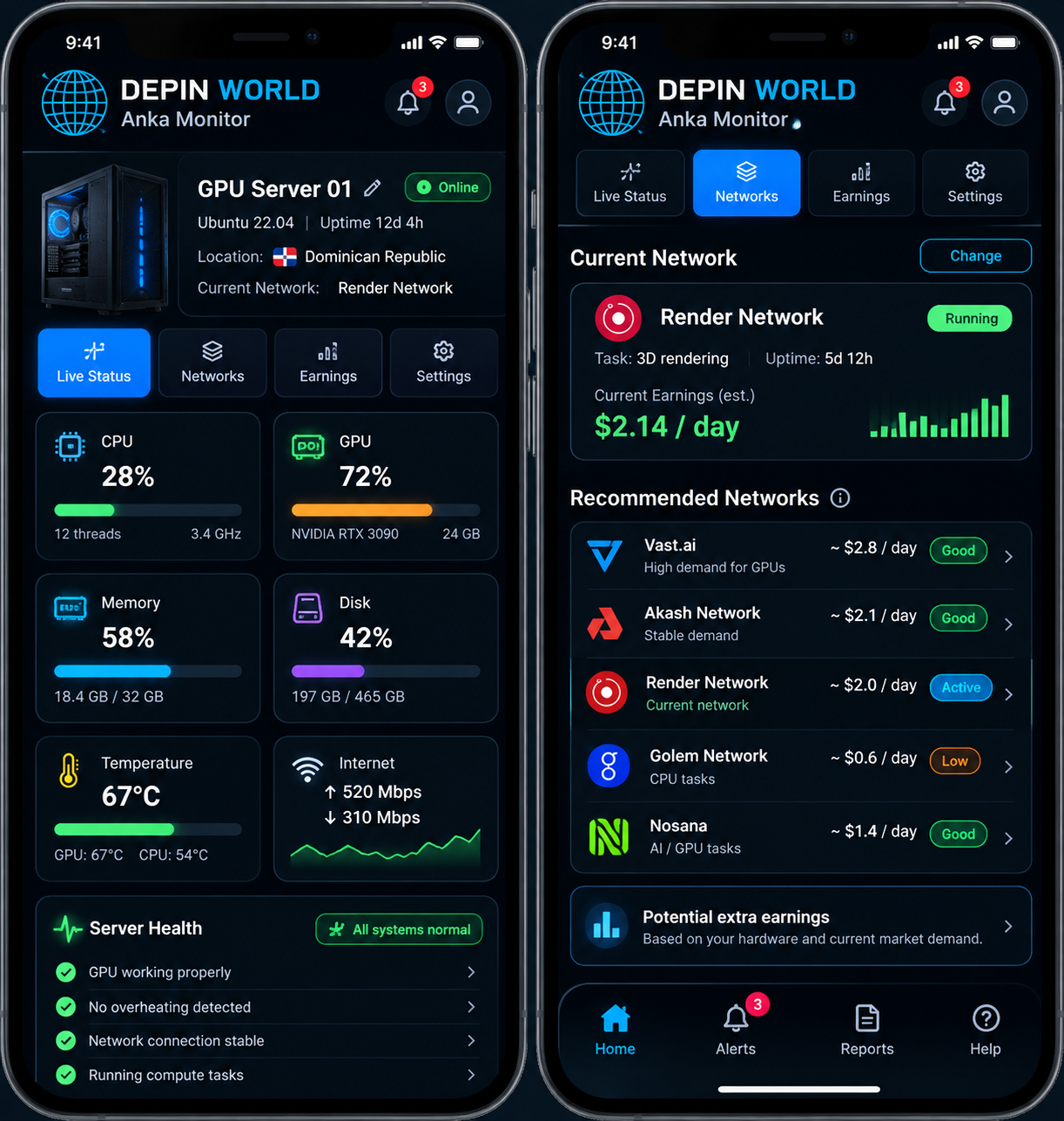
Alongside our Golden Basket packages and technical support, we are developing Anka Monitor — a mobile status panel for servers: GPU, CPU, temperatures, memory, network, and fault alerts.
Monitoring also includes recommendations for connecting equipment to suitable DePIN networks, including Akash, Render, Golem, and others, considering compatibility, current conditions, and potential economics. Any network switch or configuration change happens only with owner confirmation.
Preliminary interface. The service is under development; launch timing and conditions will be announced separately.